The product
A professional access point, built to fly on a truss.
AirTruss wraps world-class Wi-Fi in a weatherproof enclosure with a truss mount and its power built in — so you fly your network over the crowd like any fixture, and run the whole event from one page. Delivered assembled, tested, and ready to rig.
Three access points ride the same rig, from a quiet corporate room to a festival pit — rent it or own it.
How it works
One Core, and the kits you fly.
Every AirTruss setup is two things: one Core in your control position, and the kits you hang in the air. The Core is the brain — it turns a single uplink into a managed show network, and every kit answers to it. The kits are the coverage. That's why a setup is always one Core plus the kits the room needs.
Your uplink
Venue fibre · 4G/5G · Starlink
Auto-failover if it drops
The Core
Your control position, in the rack
The kits
Flown on the truss · 1 to 6+
One uplink lands in the Core; add kits until the room is covered. If that uplink drops, the Core fails over to a 4G/5G or Starlink backup on its own — the portal shows the switch live.
Fly the kits
Hang each kit on the truss like a fixture — one captive pin, horizontal or vertical. A 230 V outlet nearby powers it. Nothing to configure in the air.
Land one cable in the Core
The Core sits in your rack at the control position. Your site uplink goes in, and every kit reports back to it — one Core runs the whole show.
Type the serial number
The Core comes up in the Fleet portal by its engraved serial. You run the network, per-team passwords, Show Mode and the report from one page — never a network interface.
You always need one Core. The kits are access points — they don't run a show on their own; they answer to the Core, which holds the gateway, the portal and every safeguard. It's why each rental pack and every purchase starts with a Core, then adds kits.
The access points
Three access points.
One box, Core and mount.
We don't reinvent the hardware. AirTruss is built on Ubiquiti UniFi — serious, world-recognised Wi-Fi that any network tech already knows. You pick the access point for the room; the same box, Core and mount carry all three. One rig, the whole range.
| Reference AirTruss One Mesh | More throughput AirTruss One Flow | Density AirTruss One Crowd | |
|---|---|---|---|
| Standard / bands | Wi-Fi 6 · 2.4 + 5 GHz | Wi-Fi 7 · 2.4 + 5 GHz | Wi-Fi 7 · 5 + 6 GHz, 12 streams |
| Weather rating | IP66/67 | IP66/67 | IP66/67 |
| Coverage | ~185 m², omni 360° | up to 465 m², directional 45° | 465+ m², selectable 50°/90° |
| Simultaneous clients | 300+ | 250+ | 1,500+ |
| Uplink / power | GbE · PoE or 230 V | 2.5 GbE · PoE+ | 10 GbE · PoE++ |
| Deployment | Most flexible: PoE, 230 V, or both — mesh needs no data cable | Network cable required (mains optional) | Network cable + 230 V at the box (required) |
| Best for | Touring, express rig, cable-free zones | Cabled stage / forecourt, more throughput | Pit, stands, marquee — the crowd |
Three ways to connect — maximum flexibility
The Mesh and Flow kits take whatever the position gives you and pick the live source automatically — the three face LEDs show which, so there's nothing to decide at rig time. The One Crowd is the exception: it's the big one, and it draws more power than a network cable can carry, so it always wants a 230 V outlet at its position.
PoE only
One network cable carries both power and data. No mains needed at the position.
230 V only
Just a mains outlet nearby — with the One Mesh, data rides the wireless mesh, so no network cable at all.
Both — redundant
PoE and mains together: pull either source mid-show and the Wi-Fi never drops.
How we size it — the real rule
In a crowd you size by device count, not floor area: count roughly one Mesh/Flow kit per 150–200 simultaneous devices, and one Crowd per ~1,000 in a pit or stand, its beam aimed precisely at the public. The Fleet portal shows real load per kit — you add a kit when the amber appears, not when a brochure says so.
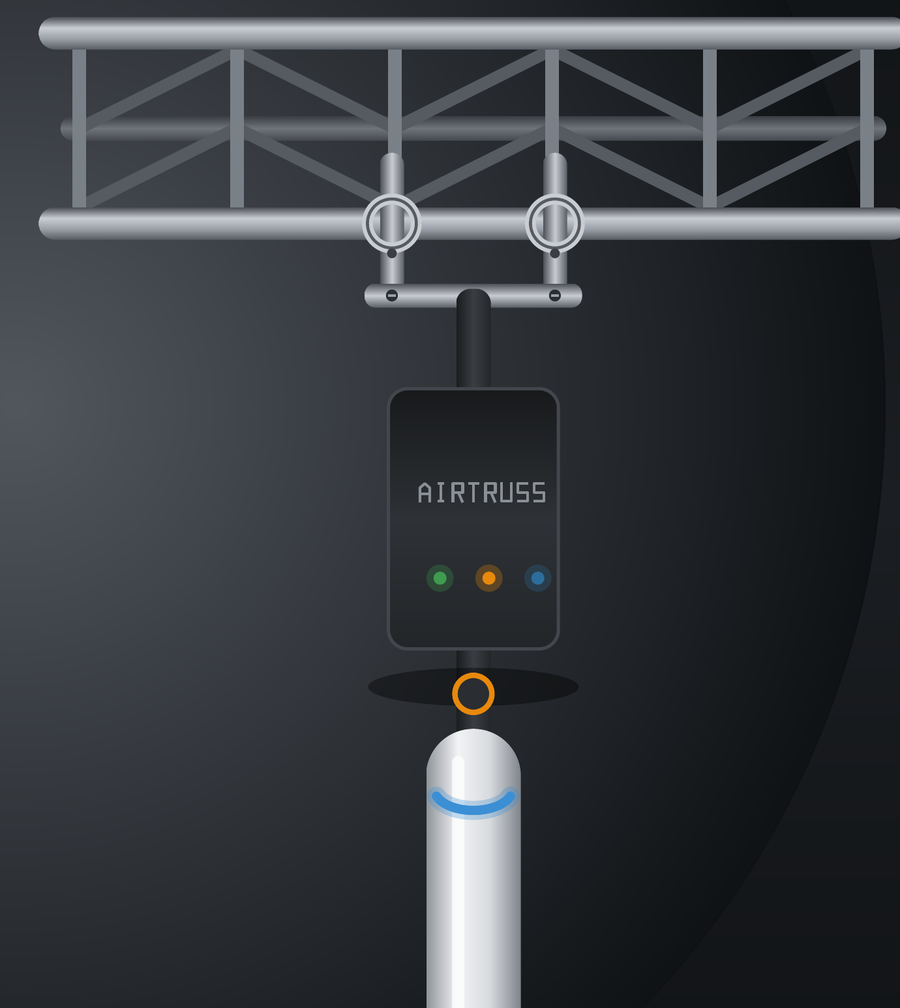
One kit, flown like a fixture.
Clamp it to an upright or hang it under a chord — vertical or horizontal on one captive pin, about 15 seconds flat.
Then daisy-chain the kits together — network and power both loop through from one kit to the next, so a single cable feeds the next access point along the truss. You run one line and coverage carries to the end of the structure.
AirTruss One
Outdoor · IP66/67The building block: a UniFi access point, an outdoor IP66/67 enclosure with the power injector built in, and a mechanical mount engineered for the truss — safety bond, connector caps and a lid guide included. Every kit is built for the weather, whichever access point you choose — same box, same rig.
In the box
- UniFi access point (Mesh / Flow / Crowd)
- Weatherproof enclosure, power injector built in
- H/V truss mount, one captive pin
- Captive safety bond + connector caps
- Lid-mounted quick guide
Mount
- Conversion
- Horizontal ↔ vertical with one captive pin — about 15 seconds
- One rig, any access point
- The same box and mount carry Mesh, Flow or Crowd — just swap the AP
- Rigging
- Standard 48–51 butterfly hooks + captive safety bond
Power
- Built-in injector
- A 60 W injector lives in the box — one 230 V outlet powers any AP, anywhere
- Sources
- PoE alone, 230 V alone, or both — switched automatically, nothing to set
- Status
- 3 LEDs: PoE upstream / 230 V / AP
- One Crowd
- 230 V at the box required for the densest access point
Enclosure & connectors
- Enclosure
- Sealed polycarbonate, IP66/IP67, class II
- Panel
- 6× Neutrik D24 + 3 LEDs
- Connectors
- etherCON uplink & network out, powerCON TRUE1, 16 A loop-through
Built to tour
- Finish
- Powder-coated aluminium, matte black RAL 9005
- Hardware
- Stainless throughout — corrosion-proof
- Sealing
- etherCON and TRUE1 connectors, locked and capped — rain, dust, road
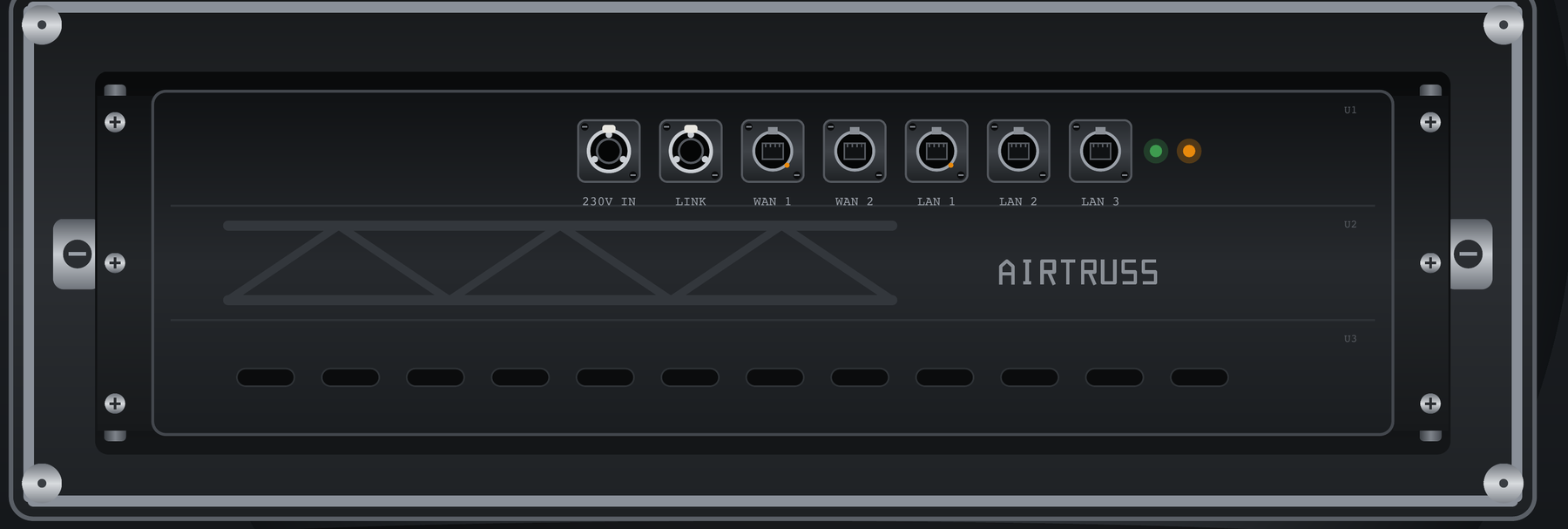
AirTruss Core Rack
Required · one per setupThe brain of every AirTruss setup: a 3U flight that sits in your control position and turns one uplink into a full show network. The kits fly; the Core runs them. A concealed gateway behind an all-Neutrik front — and with power now living in each AP box, the Core is pure data, every LAN direct, nothing to configure. Unlike the kits it isn't weather-sealed — it rides in your rack, on the dry side of the show.
See rental packsChassis
- Frame
- 3U touring flight, spring-latched — road-ready
- Front
- All-Neutrik face (7× D24) — patch it like any rack
Gateway
- Concealed
- A UniFi gateway, fully hidden behind the front — nothing to fiddle with
Data, pure
- No power hardware
- Power lives in each AP box — the Core is data only
- Ports
- All LAN direct; LAN 3 = 2.5 G
- One cable
- Uplink in, and the network is live
Beyond Wi-Fi
Runs your show's networks — honestly.
An event network doesn't carry "internet" — it carries trades. AirTruss runs lighting control, mixing tablets and AV-over-IP on one managed network, each walled off in its own lane. And it's honest about what belongs on Wi-Fi and what stays wired.
Lighting — Art-Net / sACN
Cue tablets and architectural control ride the network; the conductor and its backup stay wired through the kit's NET OUT, where the show can't afford a dropout.
Consoles & control
Mixing tablets on a dedicated, isolated 5 GHz lane with a locked channel — the number-one reason sound crews call. Your console deserves better than the venue Wi-Fi.
AV over IP — NDI, AES67
Ride the Core's wired 2.5 G LAN in their own VLAN, walled off from the guest network so a full house never touches them.
The honest rule: Dante never rides the Wi-Fi. Its clock won't tolerate it — and we say so up front, before you try. The Core's wired LAN still carries a Dante VLAN for backup, fully isolated. Straight answers beat optimistic ones once the room is full.
AirTruss Live · rental
Rent it like a fixture.
The network arrives in a flight, hangs like a moving head, and runs off its serial number. The Fleet portal is included, and it expires when the gear comes back. Flight cases are included in every pack; rates exclude VAT and delivery.
SOLO
1 Core + 2 kits
1-day rate — multi-day discounts below
Check availabilitySCÈNE
1 Core + 4 kits
1-day rate — multi-day discounts below
Check availabilityFESTIVAL
1 Core + 6 kits + 1 spare
1-day rate — multi-day discounts below
Check availabilityMulti-day — standard rental coefficients
| Days | 1 | 2 | 3 | 4 | 5 | 7 | 10 | 14 | 30 |
| × | 1.0 | 1.5 | 2.0 | 2.8 | 3.3 | 4.0 | 5.0 | 6.0 | 9.8 |
E.g. SCÈNE on a 3-day festival = 349 × 2 = 698 € · FESTIVAL for a week = 459 × 4 = 1,836 €. Weekend Fri→Mon counts as 2 days (×1.5).
Version supplements: One Flow +10 €/day per kit, One Crowd +75 €/day per AP (it replaces three in density). Mix freely — the classic being a Mesh stage pack with one Crowd over the pit.
Backup internet
- 4G/5G in the Core, 50 GB SIM, auto-failover+39 €/day
- Standalone Starlink (no site internet)+79 €/day
Services
- Install & teardown (Brussels +50 km)290 €
- Remote network manager during the show120 €/event
- Extra kit, à la carte90 €/day
Own it
Prefer to buy? Sell the payback.
The market already pays 1,200–1,800 € for a touring switch with no access point and no mount. AirTruss sits just above — access point and mount included — and for a rental house a kit pays for itself in around 22 hired days.
| Item | Price (excl. VAT & shipping) | Note |
|---|---|---|
| AirTruss One — Mesh | 2,190 € | The complete kit: access point, enclosure, H/V mount |
| AirTruss One — Flow | 2,290 € | Wi-Fi 7, 2.5 GbE uplink |
| AirTruss One — Crowd | 4,590 € | Wi-Fi 7 density; 230 V at the box required |
| AirTruss Core Rack | 1,690 € | Concealed gateway, all-Neutrik front, pure data |
| AP interface plate | 49 € | Interchangeable — Mesh / Flow / Crowd |
| Transport flight (2 / 6 kits) | 390 € / 790 € | CNC foam, one cell per kit |
All prices exclude VAT and shipping.
Fleet portal licence
390 €/year per Core · year 1 includedGo/No-Go, Show Mode, per-team PPSK, branded reports, updates and API. Without an active licence the hardware keeps working — we never hold a network hostage; you just lose the portal and pushed updates.
Talk to a Real Human
When it rings, a human answers.
Our industry lives at night and on weekends; tickets and chatbots don't. On a declared event, someone who actually does live events picks up — someone who knows what Show Mode mid-show, an RF coordination sheet and a rogue catering hotspot are.
Declared event
< 15 min callback
Direct line + pro WhatsApp
Off-event
< 4 working hours
Same channels
Baseline
Next working day
Email / portal
Tell us about your event.
Pick a date, pick a pack, and we'll bring the network in a flight — or hang a demo kit in front of you in 90 seconds.